LMS
Analytify
Onboarding
B2B
AI
WHERE THE JOURNEY BEGINS
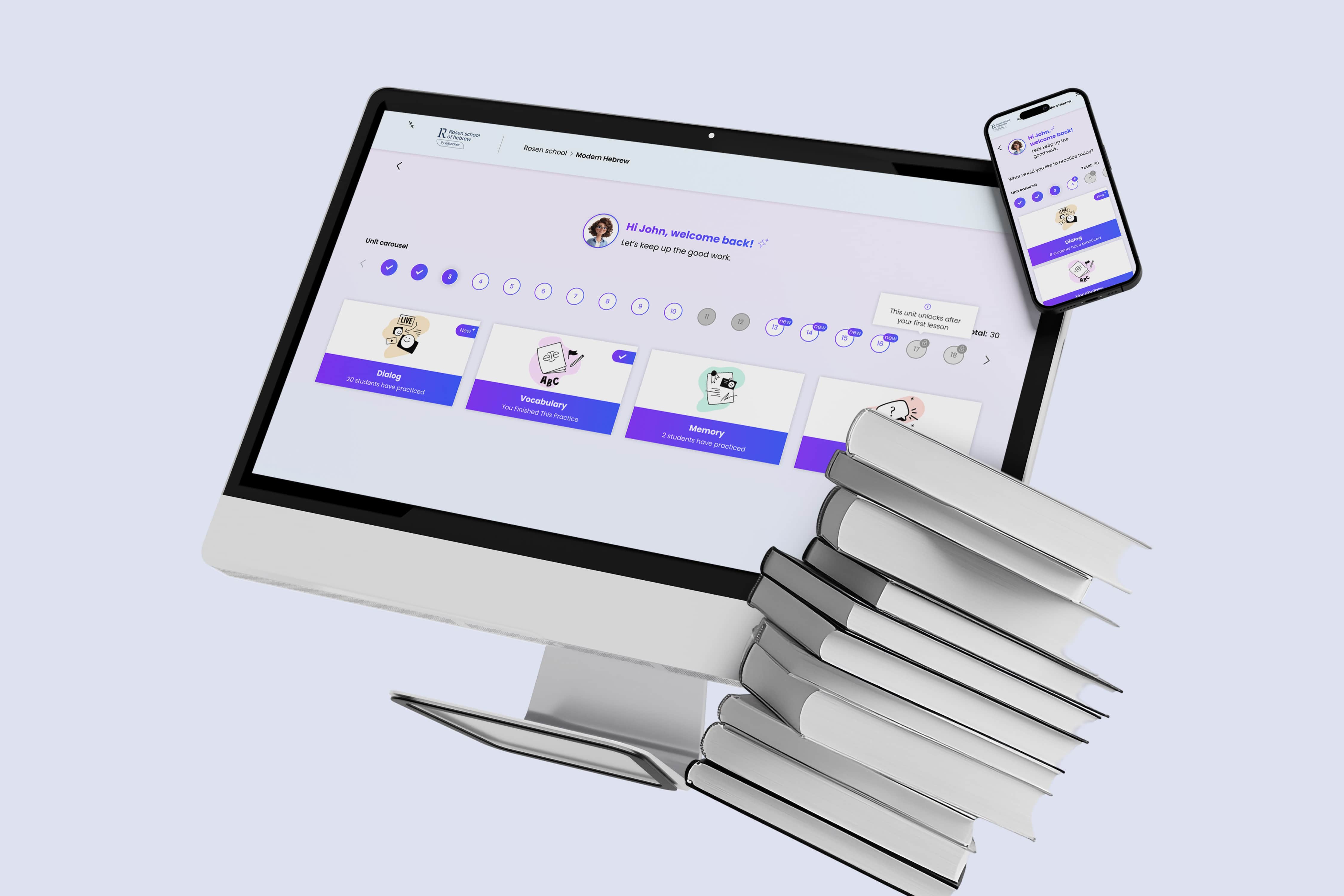
Analytify is a B2B AI data SaaS platform that helps businesses understand and make decisions on the basis of their data. Its AI agent connects to multiple systems, analyzes information, and highlights what requires attention.
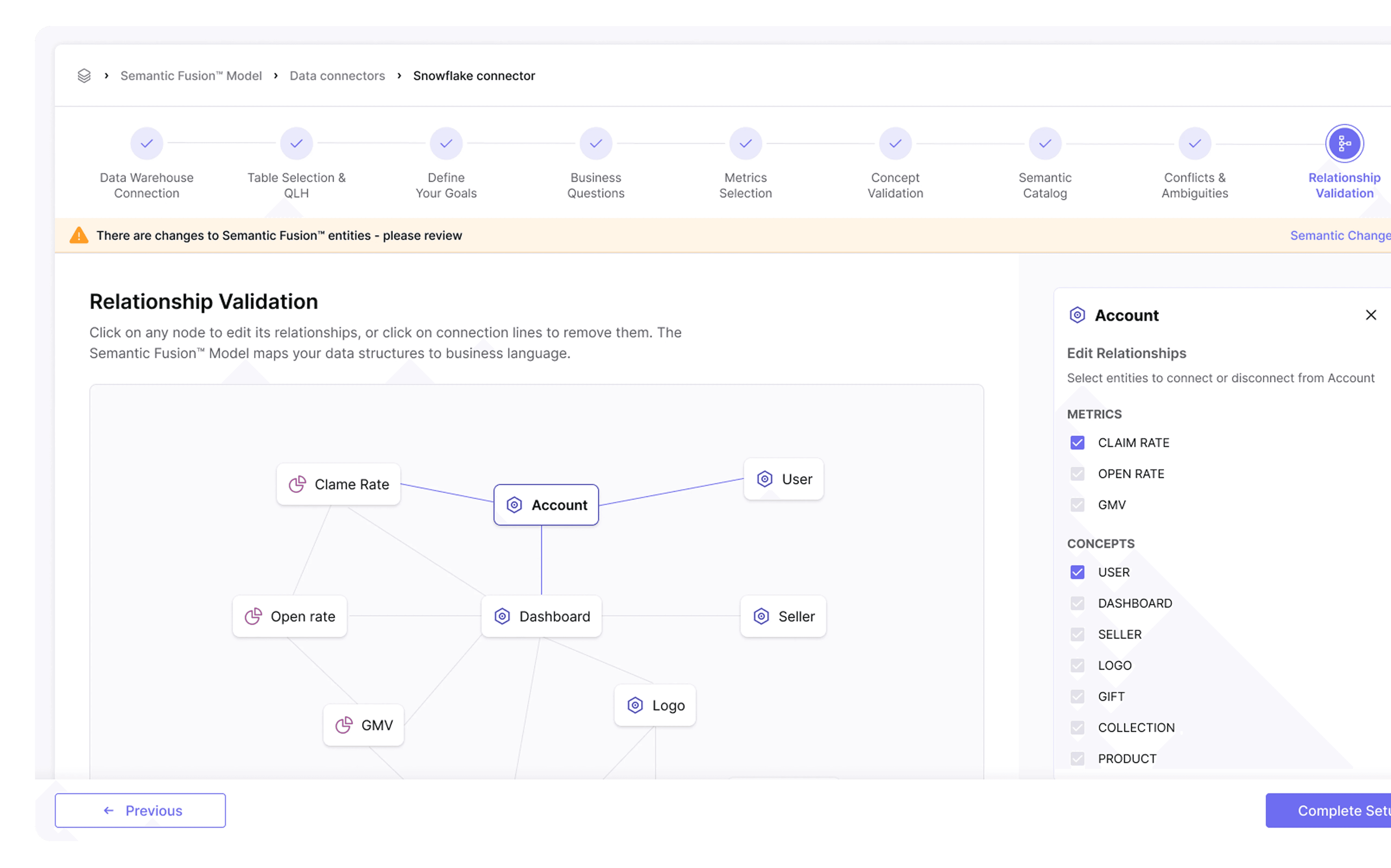
The onboarding process I designed is the second and most significant onboarding process in the system, which until now was conducted over the phone. This follows the initial onboarding. In this process, as a user, you connect the systems with the Semantic Fusion model, provide complex definitions to the agent, load tables, input goals, and more for optimal and accurate results.
*Client name changed for confidentiality
Empathizing with the User
The primary users are busy stakeholders - CEOs, COOs, and Heads of Departments (C-Level & Executives). They are looking for high-level business intelligence to drive their strategy.
Pain points in the flow
The onboarding was a manual, phone-led process. This created 3 major issues:
Low Engagement: Since a consultant handled the setup, users felt like passive observers rather than active participants. They lacked a sense of ownership over their own data.
Time-Poor: They have zero patience for complex tutorials or long waiting times (users needed to wait for setup done about 6 days after phone call). The experience must be: get in, get value, get out.
Bridging the Trust Gap: For high-level decision-makers, seeing the output isn't enough - they need to understand the process. The challenge was to move away from an opaque "black box" approach and design a transparent flow that explains how data is analyzed, making the AI's insights actionable and credible.

Nice try, AI!
New era demand from client
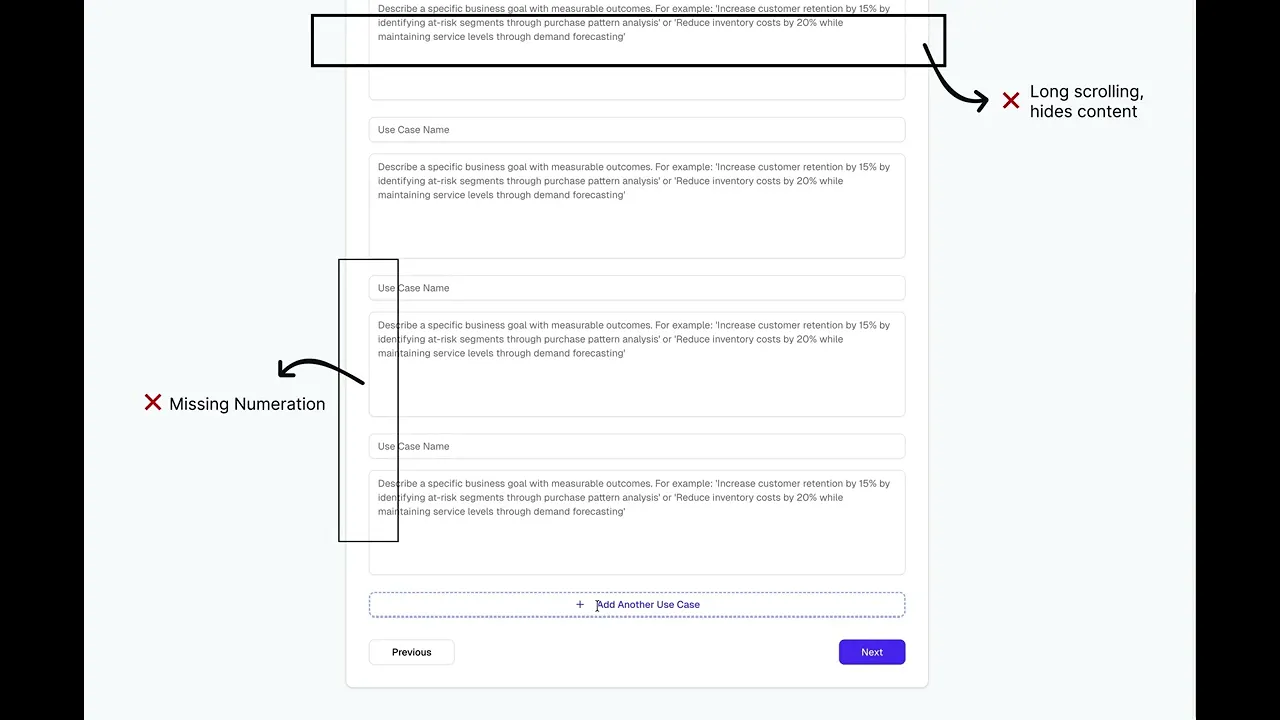
The client provided a Vibe Coded prototype - a raw, functional AI output. My goal was to take this technical foundation and fix the broken flows, improve the usability, and align the interface with the company's design system to meet the expectations of an executive audience.
Information Overload
Visual Inconsistency
Lack of Human Interaction
Orientation loss due to long scrolling
Solutions
This was defined by the client as the most complex step in the onboarding flow. At this stage, the AI identifies data points that require human validation to ensure 100% accuracy.
One frame = easy life for our user
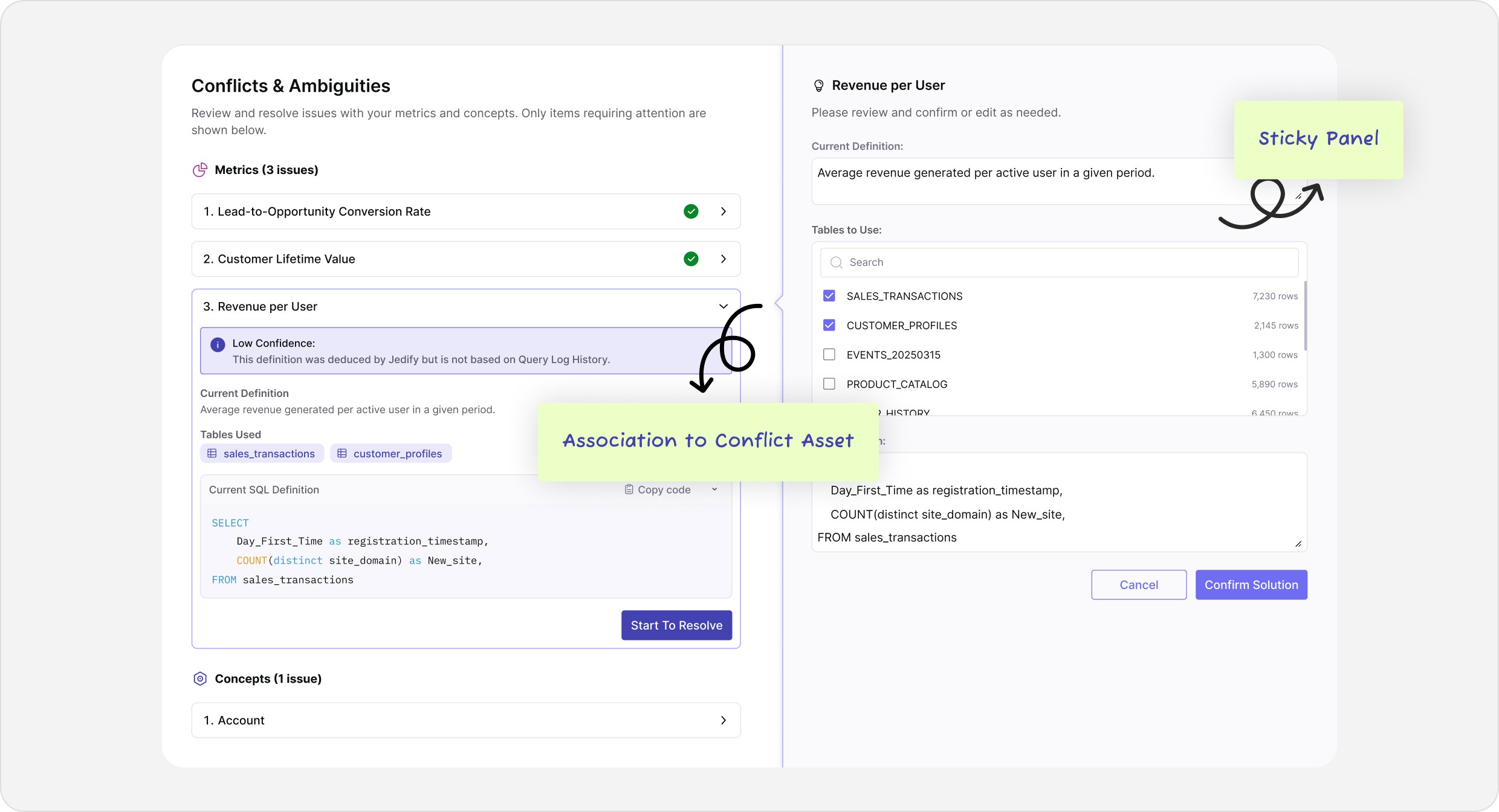
Implementing a sticky side-panel to split the screen into two functional areas. This layout allows users to view the "Task" and the "Solution" simultaneously. It eliminates unnecessary scrolling and prevents orientation loss, ensuring the user always stays within context while resolving complex issues.
Less is more - Visual Hierarchy improvement
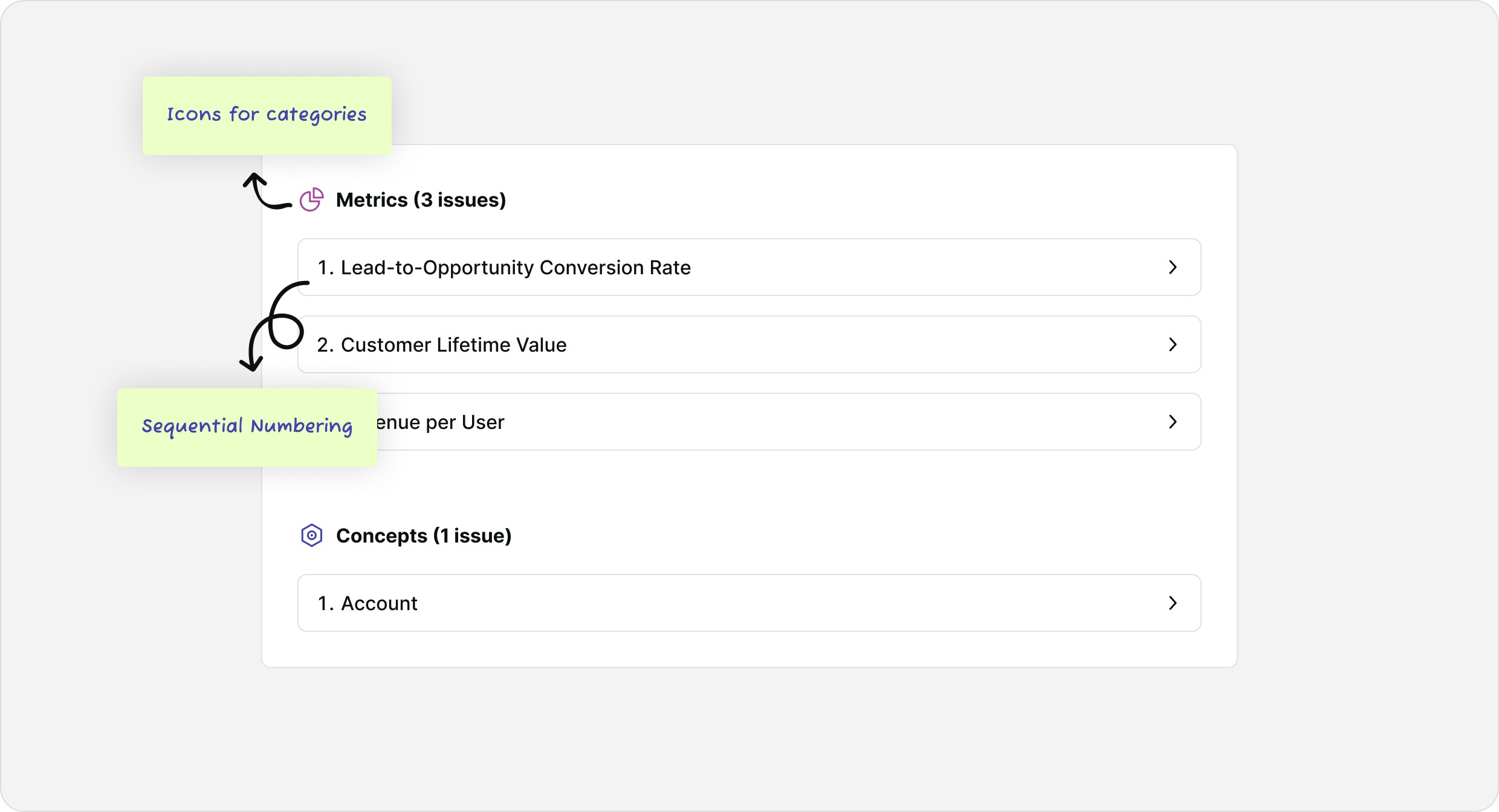
Using accordions to reduce visual noise and create a structured, step-by-step flow. By categorizing and numbering each conflict, I ensured the user can focus on solving one issue at a time without feeling overwhelmed by the entire data set.
Focus is the key that Builds Confidence
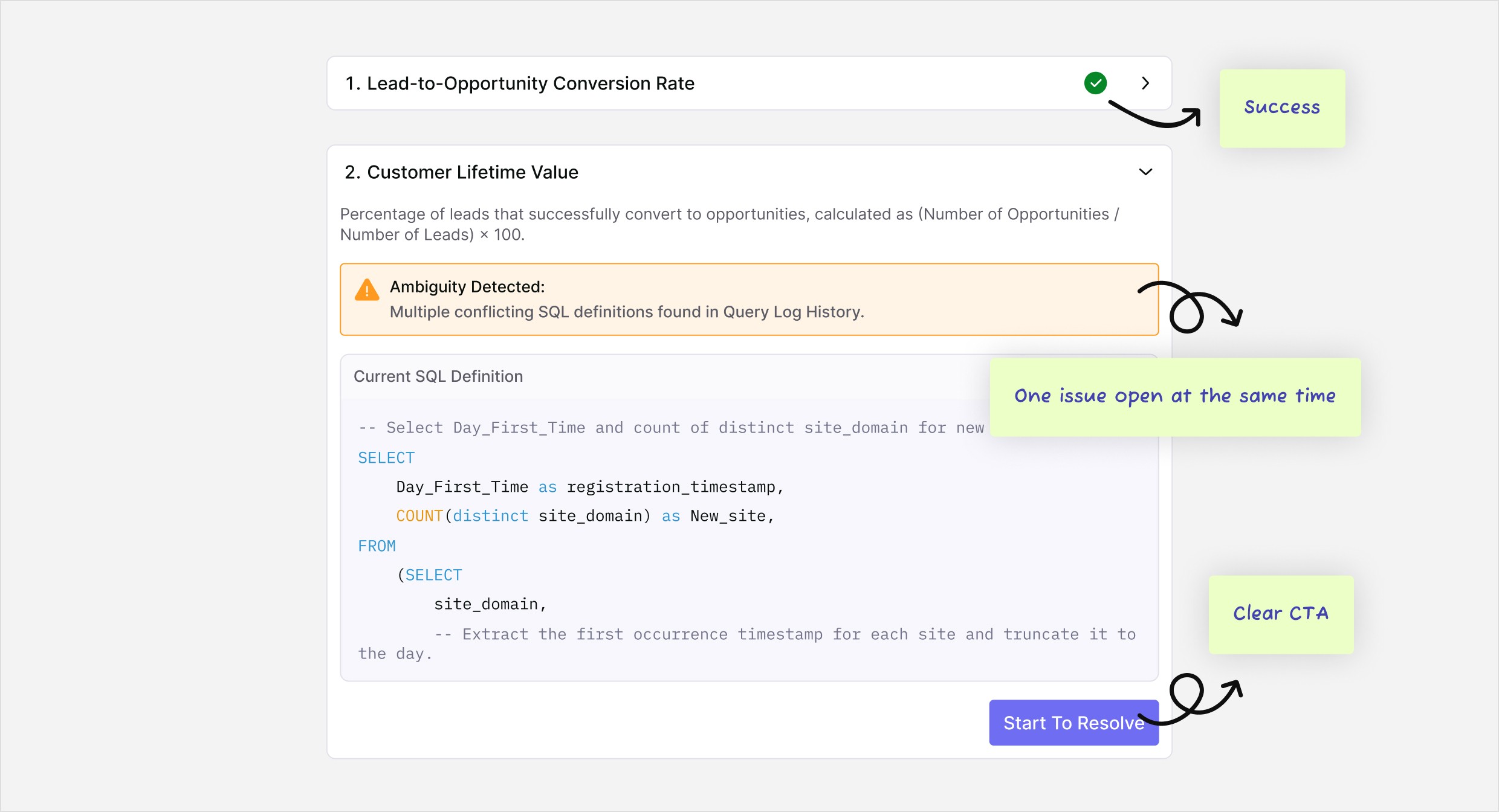
Introducing success indicators and refined micro-copy. Instead of elements simply disappearing after a fix, the "Success State" provides immediate feedback. This builds trust in the AI and gives the user a clear sense of progress and accomplishment.
Drag the slider to see how we transformed the experience.
Before
After
Little things that make a difference
I designed this popup to bridge the "experience gap" during data loading. By adding a clear time estimate and a touch of human micro-copy, I turned a technical delay into a moment of trust and brand personality.

Striving for Perfection
From Service to Product
I translated the client's vision of a self-service model into a functional reality. By digitizing the manual onboarding, we removed the dependency on human consultants, allowing users to start extracting value from the AI immediately.
Simplifying Complexity
The main challenge was converting raw AI logic into a manageable flow. I focused on reducing cognitive load by structuring the data into guided steps, ensuring that even complex configurations feel accessible to busy stakeholders.
Active User Engagement
Moving the onboarding online wasn't just a technical shift, it changed the user's role. The new flow encourages stakeholders to be active participants, giving them direct control and transparency over how their data is analyzed.
Enjoy final wizard
What I learned from this project
Working Within Design Frameworks
This was my first experience working with comprehensive Design System that builded by other company. I learned how to deep-dive into an existing component library, understand it's logic, and adapt it to new features and assets.
Designing for Time-Critical Users
I learned how to design for the "Executive Persona" - users who are time-poor and demand immediate value. I gained experience in translating complex AI configurations into a self-service flow that empowers executives to feel in control of their AI Agent's goals from the very first moment.
Professional Communication and Ownership
This project boosted my confidence in presenting and defending my design decisions. My proposals were consistently welcomed by the team, teaching me the importance of clear communication and building trust with stakeholders.
More Projects

LMS
Analytify
Onboarding
B2B
AI
WHERE THE JOURNEY BEGINS
Analytify is a B2B AI data SaaS platform that helps businesses understand and make decisions on the basis of their data. Its AI agent connects to multiple systems, analyzes information, and highlights what requires attention.
The onboarding process I designed is the second and most significant onboarding process in the system, which until now was conducted over the phone. This follows the initial onboarding. In this process, as a user, you connect the systems with the Semantic Fusion model, provide complex definitions to the agent, load tables, input goals, and more for optimal and accurate results.
*Client name changed for confidentiality
Empathizing with the User
The primary users are busy stakeholders - CEOs, COOs, and Heads of Departments (C-Level & Executives). They are looking for high-level business intelligence to drive their strategy.
Pain points in the flow
The onboarding was a manual, phone-led process. This created 3 major issues:
Low Engagement: Since a consultant handled the setup, users felt like passive observers rather than active participants. They lacked a sense of ownership over their own data.
Time-Poor: They have zero patience for complex tutorials or long waiting times (users needed to wait for setup done about 6 days after phone call). The experience must be: get in, get value, get out.
Bridging the Trust Gap: For high-level decision-makers, seeing the output isn't enough - they need to understand the process. The challenge was to move away from an opaque "black box" approach and design a transparent flow that explains how data is analyzed, making the AI's insights actionable and credible.
Nice try, AI!
New era demand from client
The client provided a Vibe Coded prototype - a raw, functional AI output. My goal was to take this technical foundation and fix the broken flows, improve the usability, and align the interface with the company's design system to meet the expectations of an executive audience.
Information Overload
Visual Inconsistency
Lack of Human Interaction
Orientation loss due to long scrolling
Solutions
This was defined by the client as the most complex step in the onboarding flow. At this stage, the AI identifies data points that require human validation to ensure 100% accuracy.
One frame = easy life for our user
Implementing a sticky side-panel to split the screen into two functional areas. This layout allows users to view the "Task" and the "Solution" simultaneously. It eliminates unnecessary scrolling and prevents orientation loss, ensuring the user always stays within context while resolving complex issues.
Less is more - Visual Hierarchy improvement
Using accordions to reduce visual noise and create a structured, step-by-step flow. By categorizing and numbering each conflict, I ensured the user can focus on solving one issue at a time without feeling overwhelmed by the entire data set.
Focus is the key that Builds Confidence
Introducing success indicators and refined micro-copy. Instead of elements simply disappearing after a fix, the "Success State" provides immediate feedback. This builds trust in the AI and gives the user a clear sense of progress and accomplishment.
Drag the slider to see how we transformed the experience.
Before
After
Little things that make a difference
I designed this popup to bridge the "experience gap" during data loading. By adding a clear time estimate and a touch of human micro-copy, I turned a technical delay into a moment of trust and brand personality.
Striving for Perfection
From Service to Product
I translated the client's vision of a self-service model into a functional reality. By digitizing the manual onboarding, we removed the dependency on human consultants, allowing users to start extracting value from the AI immediately.
Simplifying Complexity
The main challenge was converting raw AI logic into a manageable flow. I focused on reducing cognitive load by structuring the data into guided steps, ensuring that even complex configurations feel accessible to busy stakeholders.
Active User Engagement
Moving the onboarding online wasn't just a technical shift, it changed the user's role. The new flow encourages stakeholders to be active participants, giving them direct control and transparency over how their data is analyzed.
Enjoy final wizard
What I learned from this project
Working Within Design Frameworks
This was my first experience working with comprehensive Design System that builded by other company. I learned how to deep-dive into an existing component library, understand it's logic, and adapt it to new features and assets.
Designing for Time-Critical Users
I learned how to design for the "Executive Persona" - users who are time-poor and demand immediate value. I gained experience in translating complex AI configurations into a self-service flow that empowers executives to feel in control of their AI Agent's goals from the very first moment.
Professional Communication and Ownership
This project boosted my confidence in presenting and defending my design decisions. My proposals were consistently welcomed by the team, teaching me the importance of clear communication and building trust with stakeholders.
More Projects
LMS
Analytify
Onboarding
B2B
AI
WHERE THE JOURNEY BEGINS
Analytify is a B2B AI data SaaS platform that helps businesses understand and make decisions on the basis of their data. Its AI agent connects to multiple systems, analyzes information, and highlights what requires attention.
The onboarding process I designed is the second and most significant onboarding process in the system, which until now was conducted over the phone. This follows the initial onboarding. In this process, as a user, you connect the systems with the Semantic Fusion model, provide complex definitions to the agent, load tables, input goals, and more for optimal and accurate results.
*Client name changed for confidentiality
Empathizing with the User
The primary users are busy stakeholders - CEOs, COOs, and Heads of Departments (C-Level & Executives). They are looking for high-level business intelligence to drive their strategy.
Pain points in the flow
The onboarding was a manual, phone-led process. This created 3 major issues:
Low Engagement: Since a consultant handled the setup, users felt like passive observers rather than active participants. They lacked a sense of ownership over their own data.
Time-Poor: They have zero patience for complex tutorials or long waiting times (users needed to wait for setup done about 6 days after phone call). The experience must be: get in, get value, get out.
Bridging the Trust Gap: For high-level decision-makers, seeing the output isn't enough - they need to understand the process. The challenge was to move away from an opaque "black box" approach and design a transparent flow that explains how data is analyzed, making the AI's insights actionable and credible.
Nice try, AI!
New era demand from client
The client provided a Vibe Coded prototype - a raw, functional AI output. My goal was to take this technical foundation and fix the broken flows, improve the usability, and align the interface with the company's design system to meet the expectations of an executive audience.
Information Overload
Visual Inconsistency
Lack of Human Interaction
Orientation loss due to long scrolling
Solutions
This was defined by the client as the most complex step in the onboarding flow. At this stage, the AI identifies data points that require human validation to ensure 100% accuracy.
One frame = easy life for our user
Implementing a sticky side-panel to split the screen into two functional areas. This layout allows users to view the "Task" and the "Solution" simultaneously. It eliminates unnecessary scrolling and prevents orientation loss, ensuring the user always stays within context while resolving complex issues.
Less is more - Visual Hierarchy improvement
Using accordions to reduce visual noise and create a structured, step-by-step flow. By categorizing and numbering each conflict, I ensured the user can focus on solving one issue at a time without feeling overwhelmed by the entire data set.
Focus is the key that Builds Confidence
Introducing success indicators and refined micro-copy. Instead of elements simply disappearing after a fix, the "Success State" provides immediate feedback. This builds trust in the AI and gives the user a clear sense of progress and accomplishment.
Drag the slider to see how we transformed the experience.
Before
After
Little things that make a difference
I designed this popup to bridge the "experience gap" during data loading. By adding a clear time estimate and a touch of human micro-copy, I turned a technical delay into a moment of trust and brand personality.
Striving for Perfection
From Service to Product
I translated the client's vision of a self-service model into a functional reality. By digitizing the manual onboarding, we removed the dependency on human consultants, allowing users to start extracting value from the AI immediately.
Simplifying Complexity
The main challenge was converting raw AI logic into a manageable flow. I focused on reducing cognitive load by structuring the data into guided steps, ensuring that even complex configurations feel accessible to busy stakeholders.
Active User Engagement
Moving the onboarding online wasn't just a technical shift, it changed the user's role. The new flow encourages stakeholders to be active participants, giving them direct control and transparency over how their data is analyzed.
Enjoy final wizard
What I learned from this project
Working Within Design Frameworks
This was my first experience working with comprehensive Design System that builded by other company. I learned how to deep-dive into an existing component library, understand it's logic, and adapt it to new features and assets.
Designing for Time-Critical Users
I learned how to design for the "Executive Persona" - users who are time-poor and demand immediate value. I gained experience in translating complex AI configurations into a self-service flow that empowers executives to feel in control of their AI Agent's goals from the very first moment.
Professional Communication and Ownership
This project boosted my confidence in presenting and defending my design decisions. My proposals were consistently welcomed by the team, teaching me the importance of clear communication and building trust with stakeholders.